How to Design Cars in Car Parking Multiplayer (2026 Guide)
To design a car in Car Parking Multiplayer, open your Garage, select a vehicle, tap Customize → Exterior, then choose a paint type (solid, metallic, matte, or chrome), apply it, add rims and accessories, layer decals in the vinyl editor, and save your design before test-driving it. The whole process takes most players 5–15 minutes per car.
Car design is one of the most popular features in Car Parking Multiplayer (CPM), letting players build anything from a clean racing livery to a full anime-themed wrap. A well-designed car isn’t just cosmetic — it can boost your visibility in multiplayer lobbies, signal your roleplay identity, and increase how much other players are willing to pay for it in trades.
This guide walks through every step of the design process, the paint and decal systems, common mistakes to avoid, and how to build cars that hold their value.
What You Need Before You Start
- The car you want to design must already be owned or unlocked in your garage.
- Some paint finishes, decals, and body kits are locked behind in-game currency or a Pro Membership; free-tier players have a smaller but still usable selection.
- A stable internet connection if you plan to copy a design from another player online.
- A few minutes of uninterrupted play — the game does not always autosave mid-edit, so plan to finish and save in one session.
Best Car Design Styles in Car Parking Multiplayer
Most CPM builds fall into one of four recognizable styles. Picking one as a starting theme makes color and decal choices much easier.
| Style | Best For | Key Features |
|---|---|---|
| Racing | Speed/competition builds | Racing stripes, bright solid colors, lightweight rims, spoilers |
| Luxury | Roleplay, VIP lobbies | Metallic black/pearl white, chrome or gold rims, tinted windows |
| Anime | Fan-art and community builds | Character decals, vibrant color pairings, and neon accent lighting |
| Street | Aggressive, modern look | Matte black/charcoal, underglow neon, wide-body kits |
1. Racing Style
Focuses on performance aesthetics: bold stripes, high-contrast colors (red, yellow, neon green), and lightweight components that visually match a track-ready car.
2. Luxury Style
Built around elegance: deep metallic or pearl finishes, chrome/gold trim, and tinted windows for a premium, understated look.
3. Anime Style
One of CPM’s most active community trends. Anime-style builds use large character decals, saturated color combinations, and neon lighting to turn the car into a piece of rolling fan art. Wide-body sports cars typically give decals the most visible surface area.
4. Street Style
Aggressive and modern: matte or charcoal base paint, underglow lighting, and wide-body kits. Popular in urban/roleplay lobbies.
🛠️ How to Design Cars in Car Parking Multiplayer?
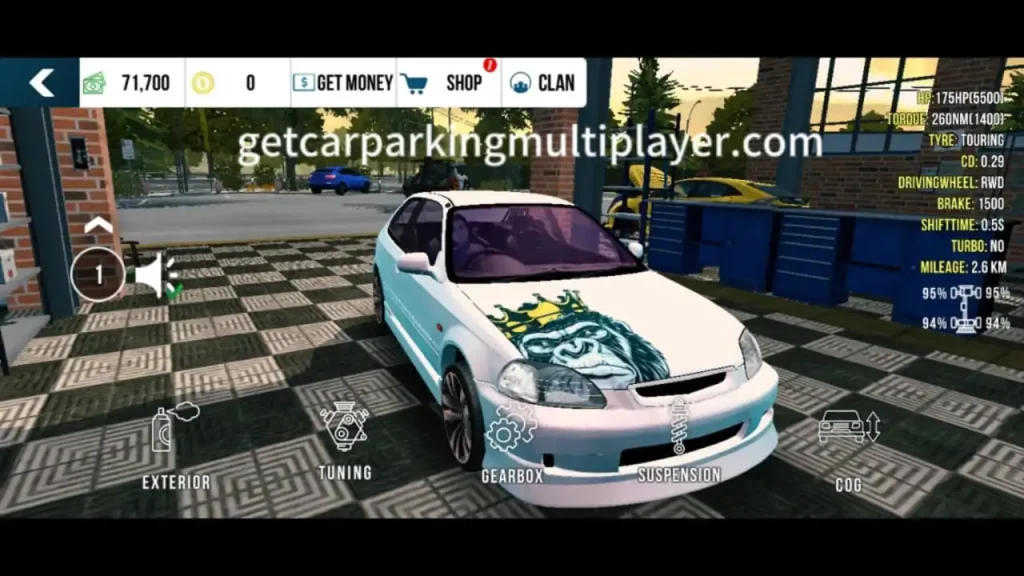
1. Open the Customization Menu
Launch CPM → tap Garage → select the car you want to design → tap Customize → Exterior.
2. Choose a Paint Type
Inside Exterior, open the Paint tab. You’ll see four core finish categories: Solid, Metallic, Matte, and Chrome (availability of some finishes depends on the car and whether it’s a free or premium vehicle). Pick a base finish before selecting a specific shade.
3. Apply Your Base Color
Browse the color wheel or preset swatches. Preview the color on the 3D model before confirming — rotate the car to check how it looks under different angles and lighting.
4. Add Rims and Accessories
Go to the Wheels/Rims tab. Choose rims that match your style (lightweight for racing, chrome/gold for luxury). Then add optional extras — spoilers, custom grilles, or a lighting kit — from the Accessories tab.
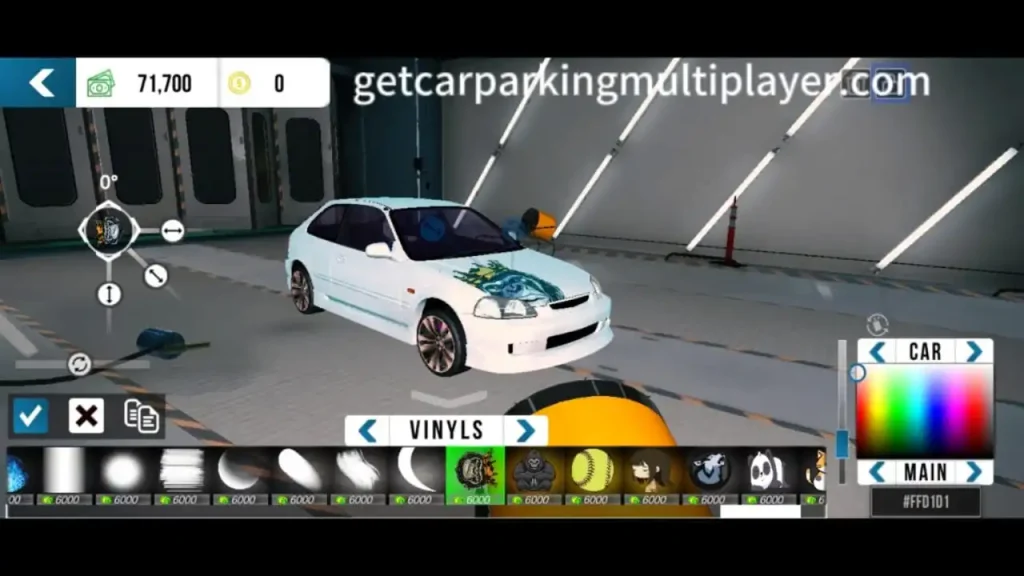
5. Open the Vinyl/Decal Editor
Tap Decals to enter the vinyl editor. You can:
- Choose from built-in decal packs, or
- Upload a custom image (where supported by your platform)
- Resize, rotate, and reposition each decal on the car’s surface grid
- Layer multiple decals to build a more complex design
6. Fine-Tune Details
Adjust window tint, caliper color, and smoke/exhaust color if available for your vehicle.
7. Save Your Design
Before exiting, tap Save. CPM does not always autosave customization work — exiting without saving can erase your progress.
8. Test-Drive and Adjust
Take the car onto a few different maps and lighting conditions (daytime, night, tunnel) to see how your color and decal choices actually read in motion. Adjust anything that looks off before finalizing.
Paint & Finish Types Compared
| Finish | Visual Effect | Typical Use Case | Access |
|---|---|---|---|
| Solid | Flat, uniform color | Racing, budget builds | Free tier |
| Metallic | Subtle sparkle/depth | Luxury, street builds | Free/Pro mix |
| Matte | No shine, flat texture | Street/aggressive builds | Free/Pro mix |
| Chrome | Mirror-like reflective finish | High-end luxury, show builds | Usually Pro-locked |
Advanced Customization Techniques
Once you’re comfortable with the basics, these techniques separate an average build from a standout one.
- Layering decals — Stack multiple smaller decals instead of one large wrap to create depth and avoid a flat, “sticker-slapped” look.
- Color gradients — Blend two complementary colors across the body for a smoother, more premium transition than a single flat tone.
- Lighting effects — Underglow and custom headlight colors draw attention in night-mode lobbies and screenshots.
- Theme matching — Keep paint, rims, decals, and lighting consistent with one style (racing, luxury, anime, or street) rather than mixing elements from all four.
How to Copy and Paste a Car Design
CPM supports copying a design from one car to another, which is useful for testing a look before committing or replicating a build across your garage.
- Go to Garage → Car Upgrade → Exterior. Your car will load in the vinyl/design editor.
- Adjust colors for the body, wheels, windows, and calipers as needed.
- Tap the Copy button once your design is finished.
- Switch to the second car and tap Paste to apply the same design.
- Save both cars separately — copying does not auto-save either vehicle.
Designing Cars for Resale Value
If you’re building cars to trade or sell in-game, design choices directly affect how fast a car moves and what price it commands.
What tends to sell well:
- Anime-inspired wraps with clean, non-cluttered decal placement
- Luxury finishes — metallic black, pearl white, chrome/gold trim
- Racing builds paired with visible performance upgrades (turbo, aero kit)
What to avoid if selling:
- Mismatched or random color combinations
- Overused, generic decal packs with no personal touch
- Skipping performance parts entirely (buyers often want both looks and function)
A car that looks distinct — a rare decal combination or an uncommon color pairing — typically stands out faster in a marketplace or trading Discord than a generic recolor.
Design Glossary
| Term | Meaning |
|---|---|
| Vinyl / Livery | The decal/wrap layer is applied over a car’s paint |
| Underglow | Neon lighting mounted under the car’s body |
| Wide-body kit | Widened fender/body panels for an aggressive stance |
| Caliper | The brake component visible through the wheel, often color-customized |
| Wrap | A full-body decal covering most of the car’s surface |
| Pro Membership | CPM’s premium tier unlocking additional paint/decal/part options |
Troubleshooting Common Design Problems
- Design not saving: Make sure you tap Save before backing out of the menu; app crashes mid-edit can also cause loss of unsaved work.
- Decals not appearing correctly: Try resizing or repositioning — some car models have irregular body geometry that distorts flat decals.
- Colors look different in-game vs. preview: Test under multiple lighting conditions (garage lighting differs from outdoor/night lighting).
- Can’t access certain finishes: Chrome and some metallic/matte options may be Pro-membership or vehicle-specific exclusives.
Conclusion
Car design in Car Parking Multiplayer comes down to two things: style and function. Whether you’re building a clean racing livery, a premium luxury cruiser, or a full anime-themed wrap, the process is the same — choose a theme, apply paint and parts that support it, layer decals with intention, and save your work.
Don’t just copy what’s popular — experiment with your own color pairings and decal combinations. That’s what makes a design memorable, and it’s often what makes it sell.
Related reading: Car Parking Multiplayer Color Codes (60+ HEX Colors) · How to Buy and Sell Cars in Car Parking Multiplayer